OAuth lets a customer connect an account from another service without giving your application their password. The customer approves a limited set of permissions, and the provider returns credentials called tokens. Building that first exchange can take an afternoon. Keeping many customer connections working for years takes a system around it.
Access tokens expire on schedules each provider chooses. Longer-lived refresh
tokens can obtain replacements, but some providers rotate them and treat reuse
as evidence of theft. Customers can remove access from the provider's side
without telling you. Even an HTTP 403 response can mean either "permission
lost" or "slow down," depending on the provider.
I have worked on this problem in production CRM integrations at Vimeo and while co-founding a venture whose public portfolio states more than 60 provider integrations. This chapter follows one illustrative Slack connection through connect, storage, refresh, failure, quarantine, and reconnection. The design patterns are general; the example identifiers and timings are invented to make the state changes visible.
How to read the diagrams
- Your platform and its records: connections, leases, keys
- The provider: authorization servers and APIs
- People: the customer admin who connects and reconnects
- Time: expiry, refresh lead, retention
- Failure: revoked grants, races, wrongful quarantine
Before you start: what OAuth connects
OAuth lets a customer give an application limited access to another service without handing the application their password. A useful analogy is a hotel keycard: it opens named doors for a limited time, while the hotel keeps control of the building. The analogy stops at renewal. An OAuth refresh token can mint another access token, so it needs stronger protection than the short-lived keycard.
Four roles take part. The user or administrator grants access. The client is the application asking for it. The provider's authorization server signs the user in, shows the consent screen, and issues tokens. The resource server is the API that accepts the access token. One provider can run both servers, but they have separate jobs.
An access token accompanies API calls and normally expires quickly. A refresh token can obtain another access token without asking the user to sign in again. Scopes name the permissions the user grants, such as reading contacts. The short-lived authorization code crosses the browser once and is exchanged by the application for the tokens.
The normal authorization-code flow looks like this. The detailed Slack example later adds the stored rows and race controls.
OAuth authorization code flow
- Admin → Your app
Connect this account
- Your app → Authorization server
Redirect with scopes, state, and PKCE challenge
- Authorization server → Admin
Sign in and approve scopes
- Authorization server → Your app
Redirect back with a one-use code
- Your app → Authorization server
Exchange code and PKCE verifier
- Authorization server → Your app
Access token, refresh token, expiry
- Your app → Provider API
Call API with the access token
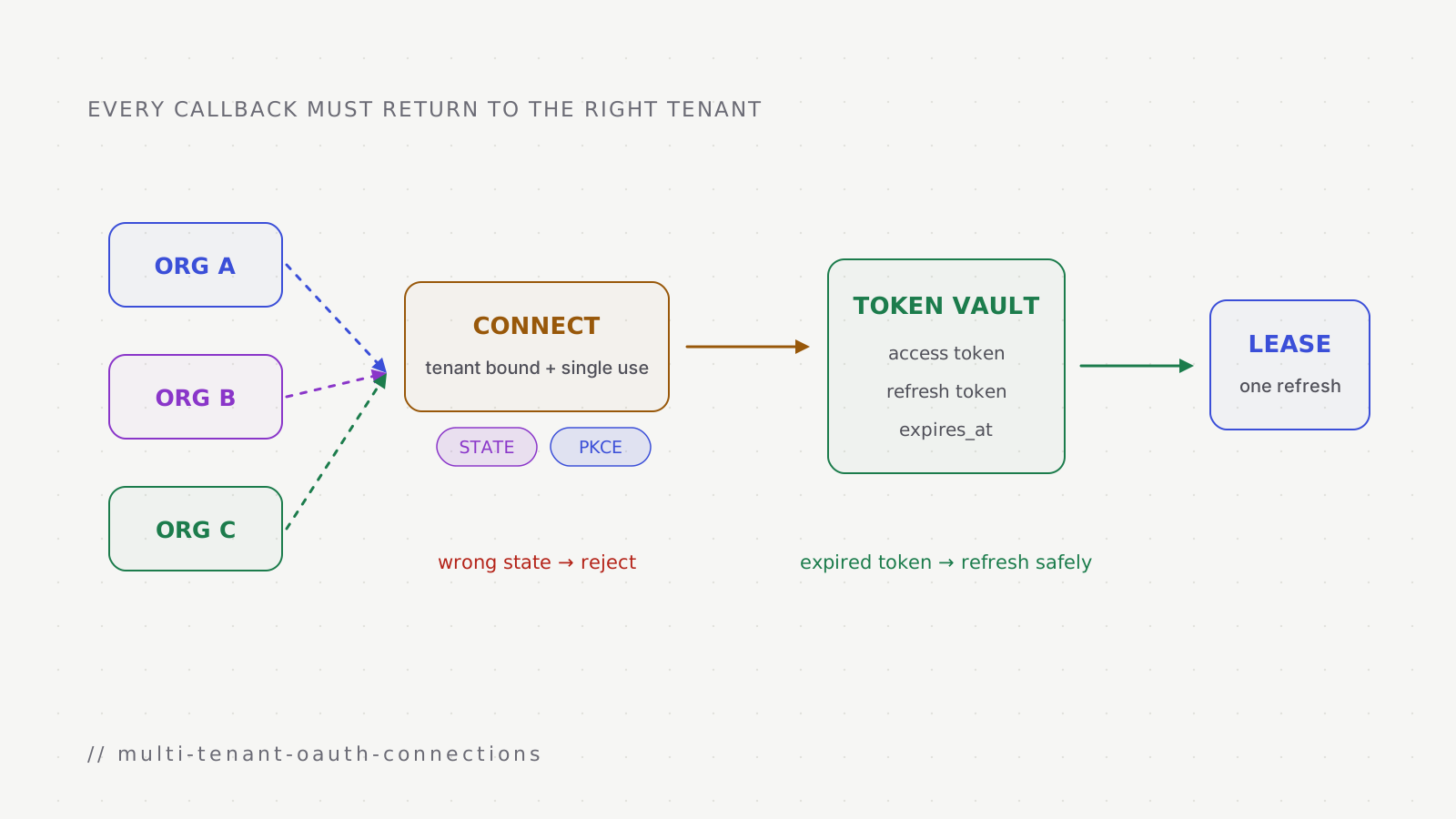
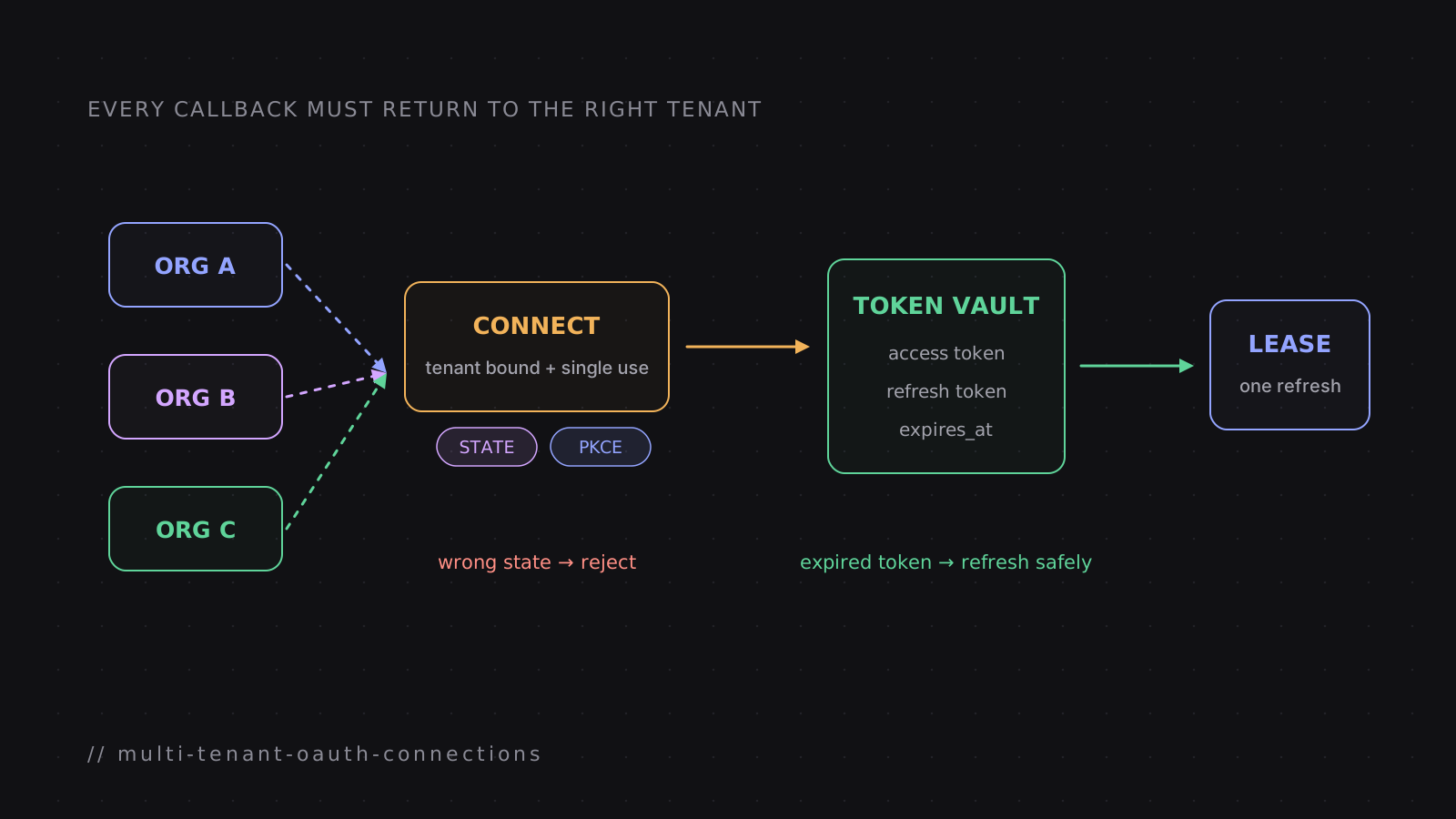
The state value ties the callback to the browser session that started the flow. Proof Key for Code Exchange, or PKCE, ties the authorization code to the client that created a secret verifier. Together they stop different attacks, so one does not replace the other. Multi-tenancy adds another boundary: every connection must also belong to the correct customer organisation.
The provider rules that catch teams out
Provider behavior varies enough to change the storage and concurrency design. These rules were checked against provider documentation in September 2026.
- provider
- rule
- At most 100 refresh tokens per Google account per OAuth client; a new one silently invalidates the oldest. Unused for six months: expired. Apps in 'Testing' get refresh tokens that expire after 7 days.
- what it breaks
- a user who connects many times, or a staging app used in production, loses connections without any error
- provider
- Slack (token rotation)
- rule
- Access tokens expire every 12 hours. Refresh tokens are single-use, revoked after a short grace period. At most 2 active tokens. Rotation can't be turned off once on.
- what it breaks
- two workers refreshing at once: one of them holds a dead token
- provider
- Salesforce
- rule
- Five approvals per user per connected app; a sixth revokes the oldest. When refresh-token rotation is enabled, reusing an old token invalidates the current refresh token and associated access tokens.
- what it breaks
- a reconnect loop or a refresh race can force a full re-authentication
- provider
- Microsoft Entra
- rule
- Refresh tokens last 90 days (24 hours for single-page apps) and replace themselves on use, but old ones are not revoked.
- what it breaks
- forgiving of races, which hides bugs until another provider punishes them
- provider
- Xero
- rule
- Access tokens last 30 minutes. Unused refresh tokens expire after 60 days. After a refresh with no response, the old refresh token can be retried for 30 minutes.
- what it breaks
- a dormant customer's connection dies after two months
- provider
- HubSpot
- rule
- Access tokens last 30 minutes (down from 6 hours in 2021); HubSpot asks integrations to read expires_in rather than hard-code a lifetime.
- what it breaks
- code that hard-coded 6 hours
RFC 9700 explains the strict rotation pattern: when a rotated refresh token is presented twice, "the authorization server cannot determine which party submitted the invalid refresh token, but it will revoke the active refresh token." Salesforce documents that family-revocation behaviour when rotation is enabled. Slack instead documents a short grace period for its spent token. The safe design handles both: serialize refreshes and treat each provider's error contract as data.
A connection is a record, not a token
The thing you are managing is a connection: an organisation's authorised link to one account at one provider. It has two independent pieces of state, and keeping them separate avoids a lot of confusion:
- Status says what the customer must do:
connected,needs_reconnect(the grant is dead and only a person can fix it), ordisconnected. - Health says what the platform last observed:
healthy,degraded(slow or throttled),unhealthy(authentication failed), orunknown(the probe couldn't tell).
A throttled connection is degraded but still connected. A connection whose probe timed out is unknown, not broken. Only proven authentication failures move a connection to needs_reconnect, because that status sends an email to a customer asking them to act.
Here is the running example, a Slack connection with token rotation turned on, as its record changes over an illustrative three-month period:
| id | status | health | expires_at (UTC) | credentials | notes |
|---|---|---|---|---|---|
| Day 0, 10:04 · connected by an admin | |||||
| conn_7d1 | connected | unknown | day 0, 22:04 | 1:key-v1:… (access, refresh) | workspace T0A1 · scopes 4 granted |
| Day 0, 21:34 · refreshed 30 minutes before expiry | |||||
| conn_7d1 | connected | healthy | day 1, 09:34 | 1:key-v1:… (new pair) | old refresh token now spent |
| Day 41 · the customer's admin removes the app in Slack | |||||
| conn_7d1 | needs_reconnect | unhealthy | day 41, 03:12 | 1:key-v1:… | refresh returned invalid_refresh_token · quarantined · admin notified |
| Day 43 · reconnected: the same row comes back | |||||
| conn_7d1 | connected | unknown | day 43, 21:50 | 1:key-v2:… (new grant) | matched on workspace T0A1 · quarantine cleared |
Two details in the last snapshot matter. Reconnecting matches on the provider's account id and revives the existing row, so history, settings, and automations that depend on the connection survive. And health is reset to unknown, not healthy: a fresh token proves the customer consented, not that the next API call will work.
Connections belong to the organisation, not to the person who clicked Connect. The user who authorised it is recorded for audit, but when they leave the company the connection keeps working, which is what customers expect from a business integration.
Connecting
The connect flow has one job beyond getting a token: making sure the token that comes back belongs to the person and organisation who started the flow.
Connecting Slack: authorization code with PKCE
- 10:03:51Admin's browser → Platform API
GET auth-url for slack
- Platform API
Check the redirect URI against the allowlist
- Platform API → State store
SET state NX EX 300
encrypted {provider, redirectUri, verifier, user, org}
- Platform API → Admin's browser
redirect to Slack with state and code_challenge (S256)
- 10:04:02Admin's browser → Slack
admin approves the requested scopes
- Slack → Admin's browser
redirect back with code and state
- 10:04:03Admin's browser → Platform API
callback
- Platform API → State store
consume state once (GET + DEL in one script)
user and org must match the session
- Platform API → Slack
exchange code with the stored verifier
- Slack → Platform API
access token, refresh token, expires_in
- Platform API
encrypt each secret, write the connection row
const verifier = randomBytes(32).toString("base64url");       // 43 characters
const challenge = createHash("sha256").update(verifier).digest("base64url");
const state = randomBytes(32).toString("hex");

const stored = await redis.set(
  `connect-state:${state}`,
  encrypt(JSON.stringify({ provider, redirectUri, verifier, userId, orgId })),
  { NX: true, EX: 300 },                                      // unguessable, single-use, short-lived
);
if (!stored) throw new Error("state collision: retry");

return provider.authorizationUrl({ redirectUri, state, codeChallenge: challenge });
Each piece has a reason:
The state value stops cross-site request forgery, and binding it to the user and organisation stops a valid code from being delivered into someone else's session. Consuming it with one atomic operation means it can be used exactly once even if the callback is hit twice at the same moment. A mismatch between the stored user and the session is worth an alert, because it is either a bug or an attack.
PKCE (RFC 7636) binds the code to the party that started the flow. The verifier is 43 to 128 characters; the sketch derives one from 32 random bytes. RFC 7636 requires S256 when the client can use it, and RFC 9700 requires PKCE for public clients while recommending it for confidential clients. Keep the verifier on the server for this flow. Test every provider implementation because support and token-endpoint requirements differ.
The redirect URI must be checked against an allowlist before anything is created. RFC 9700 asks authorization servers for exact string matching, and your own check should be at least that strict: an origin allowlist that ignores the path and query string is an open redirect waiting to be found.
Idempotency on the connect call helps when a browser retries. If you use idempotency keys, scope them to the organisation and provider; a key that is global can hand one organisation the result of another's request.
Storing tokens
Tokens are credentials for someone else's account, so they get the strictest storage in the platform.
Encrypt each secret separately with AES-256-GCM, and store the key id inside the ciphertext:
1:key-v2:9f3c…(iv):a41e…(auth tag):7b0d…(ciphertext)
^  ^
|  key id: which key encrypted this value
format version
Putting the key id in each value is what makes key rotation possible without downtime:
Rotating the encryption key
Add the new key and make it active
New writes use key-v2. Reads work for both keys, because each value says which key it needs.
active: key-v2 · still loaded for reads: key-v1
Sweep old values
A scheduled job finds values still under the old key with a plain string match on the prefix, without decrypting anything, and re-encrypts them in bounded batches.
WHERE access_token NOT LIKE '1:key-v2:%'
Write back only if the token generation is unchanged
The sweep records refresh_version before decrypting. It writes the new ciphertext only while that version still matches, so a completed refresh always wins.
refresh_version changed → skip; never overwrite a newly issued rotating token
Drop the old key when the count reaches zero
A gauge of values still awaiting re-encryption tells the operator when key-v1 can be removed.
awaiting re-encryption: 0
Two sharp edges. In a LIKE pattern, _ matches any character, so a key id such as key_v2 must be escaped or it will also match key-v2. The service should also refuse to start when its configured encryption keys are missing, rather than quietly generating a replacement and making stored ciphertext unreadable.
Use a fresh, unpredictable 96-bit nonce for every GCM encryption under a key; reusing a key-and-nonce pair breaks GCM's security. Bind the ciphertext to the organisation, connection row, provider, and credential field as additional authenticated data. Then a token copied to another row, or swapped from the refresh-token field into the access-token field, fails to decrypt in its new location.
Refreshing without racing yourself
Many access tokens expire within an hour. A platform with many connections refreshes throughout the day, and every refresh is a chance to lose a connection.
When to refresh
A scheduled sweep picks connections that expire within a lead time and queues a refresh for each. The lead time depends on the provider. WorkOS suggests refreshing at about 75% of the token lifetime; this adapts to different lifetimes, though very short-lived tokens need careful load budgeting. The sweep should take connections round-robin across organisations, so one customer with many connections does not delay everyone else. Any timing in this example is illustrative; production values belong in provider-specific policy backed by current documentation and measurements.
Tokens also get refreshed on demand: immediately before a worker calls the provider if the token expires within a minute, and once after a 401, followed by one retry. Proactive refresh keeps tokens fresh; on-demand refresh covers everything the sweep missed.
The race
Now the dangerous part. Here is what happens with single-use refresh tokens and a lock that is only a lock:
Two workers, one single-use refresh token
- 21:34:00Worker A → Redis lease
SET lock '1' NX EX 30
- 21:34:01Worker A → Salesforce
refresh with token R1
- 21:34:31Redis lease
lease expires: A is still waiting
- 21:34:32Worker B → Redis lease
SET lock '1' NX EX 30: succeeds
- 21:34:33Worker B
read durable attempt for R1: outcome unresolved
do not present R1 again until the provider-specific recovery rule allows it
- 21:34:34Salesforce → Worker A
A gets (T2, R2); writes refresh_version 8
- 21:34:34Worker A → Redis lease
conditional DEL fails: B owns the lease
- 21:34:35Worker B
re-read version 8 and use the committed token pair
Every step of that is a real failure mode, and the fixes cover different parts of it. WorkOS puts the underlying point well: "A Redis lock is a lease, not mutual exclusion." Nango describes the local-write race: without care, "the last process to complete might overwrite the 'good' new token with an already-expired one." A fence solves that overwrite. It does not undo a second refresh request that already reached the provider.
The fixes, layered:
- Deduplicate work with a job id per connection, so another refresh for the same connection is not queued while one is pending.
- Fence the lease by storing a random value per acquisition, extending the lease while the refresh is in flight, and releasing it only if the value is still yours. A lease is a lock with an expiry; it limits overlap but cannot prove that the old holder stopped running.
-- KEYS[1] = refresh-lease:conn_7d1, ARGV[1] = this acquisition's UUID
if redis.call("GET", KEYS[1]) == ARGV[1] then
  return redis.call("DEL", KEYS[1])
end
return 0- Write with compare-and-set. Even with a fenced lease, a worker can pause past its lease because of garbage collection or a slow network. A numeric
refresh_versionchanges only when refresh state changes; key re-encryption leaves it alone. That distinction lets a freshly issued rotating token survive a concurrent key sweep while still rejecting a stale refresh worker:
UPDATE connections
SET credentials = $new_credentials,
    expires_at = $new_expiry,
    refresh_version = refresh_version + 1
WHERE id = $id
  AND status = 'connected'           -- a disconnect or quarantine wins
  AND refresh_version = $read_version; -- another refresh wins
-- 0 rows: someone else got there first; discard these tokens- Persist a refresh-attempt record before presenting a rotating token. If its owner disappears, a replacement sees an unresolved attempt and does not blindly present the same token. It waits for the first attempt's deadline, then follows the provider's contract: retry the old token only inside a documented grace window, query status when the provider supports it, or require reconnection when no safe recovery exists.
- A worker that loses the race waits briefly, re-reads the row, and uses the
fresh token if one appeared. It also performs that version check before
acting on a dead-token error. An
invalid_grantfrom version 7 cannot quarantine a row that has already advanced to version 8. If the refresh is still in progress, a request-path caller can return503withRetry-Afterinstead of starting a second refresh. - A scheduler that loses its own lease mid-sweep stops queuing. This reduces duplicate jobs before the connection-level controls have to handle them.
| moment | credentials | expires_at | outcome |
|---|---|---|---|
| both workers used the same generation | |||
| 21:34:00 | version 7 · R1 | day 0, 22:04 | both calls started from version 7 |
| worker A writes first | |||
| 21:34:34 | version 8 · (T2, R2) | day 1, 09:34 | 1 row updated |
| worker B observes the committed result | |||
| 21:34:35 | version 8 · unchanged | day 1, 09:34 | reuse version 8; no second refresh call |
Some providers soften the damage. Slack keeps the old refresh token valid for a short grace period, and Xero lets you retry with the old refresh token for 30 minutes after a refresh that got no response. Build as if no provider does.
Small bugs that look like big ones
Refresh has a few failure modes that are easy to miss in review because each looks harmless:
- Losing the expiry. If a refresh response has no
expires_inand the code writesexpires_at = null, the connection drops out of the sweep forever and fails only when a call hits a 401. If the code keeps an expiry that has already passed, the sweep picks the connection every time it runs. Keep an old expiry only if it is still in the future. - Failed jobs that block new ones. BullMQ documents that a custom
jobIdis ignored while a job with that id still exists. A retained failed refresh can therefore suppress the next enqueue. Choose an explicit removal policy for completed and failed jobs, and record the outcome somewhere durable before removal. - Retrying forever. A refresh that keeps failing for a reason other than a dead grant needs backoff stored on the connection (minutes, doubling up to a few hours, or longer if the provider's
Retry-Aftersays so), not an infinite loop every sweep.
Telling auth failures from throttling
Most of the damage an integration platform does to itself comes from misreading an error. Marking a working connection as broken sends a customer an alarming email and stops their automations until someone reconnects.
For a failed refresh, the OAuth error code decides:
- provider says
- invalid_grant (OAuth providers)
- meaning
- The token used by this attempt is dead: revoked, expired, or already used
- action
- compare refresh_version; quarantine only if the failed token is still current
- provider says
- invalid_refresh_token (Slack)
- meaning
- Slack rejected the refresh token
- action
- compare refresh_version; if still current, needs_reconnect and notify
- provider says
- invalid_client / unauthorized_client
- meaning
- Your app's credentials are wrong: a platform problem, not the customer's
- action
- alert your team; never quarantine the customer
- provider says
- anything else
- meaning
- Network, 5xx, rate limit
- action
- back off on the connection and retry later
The second row hides a platform-wide risk. If the client secret for a provider is missing after a bad deploy or configuration mistake, every refresh for that provider fails at once. A classifier that treats every refresh failure as the customer's fault could quarantine every customer's connection to that provider in one sweep. Validate required provider credentials before serving traffic and test that an empty credential stops the provider call before it can affect connection state.
For a failed API call, a 401 means the token was rejected: refresh once and retry once. A 403 is harder, because providers use it for two unrelated things:
- signal
- WWW-Authenticate: Bearer error="invalid_token" or "insufficient_scope" (RFC 6750)
- means
- the token or its scopes are no good
- treat as
- auth failure
- signal
- Google reason insufficientPermissions, authError
- means
- missing permission or bad credentials
- treat as
- auth failure
- signal
- Salesforce REQUEST_LIMIT_EXCEEDED (sent as 403)
- means
- the org's API limit is used up
- treat as
- throttling
- signal
- Google quota reasons, RESOURCE_EXHAUSTED; Meta error codes 4, 17, 32, 613
- means
- rate or quota limits
- treat as
- throttling
- signal
- a bare 403 with none of the above
- means
- unknown
- treat as
- unproven: never quarantine on it
A 403 does not trigger the one refresh a 401 gets. On providers with single-use refresh tokens, spending a refresh on a throttling error burns a token for nothing and adds a chance to race.
Health checks and quarantine
Waiting for a customer's automation to fail before noticing a revoked connection is the most expensive way to find out. A health watchdog probes connections on a schedule: every few minutes it takes the connections that were checked longest ago, a batch at a time, and makes one read-only call to each (for a CRM, listing custom fields; for others, fetching the account profile).
One probe, from check to quarantine
Refresh first if the token is about to expire
A probe that fails only because the token lapsed a second ago proves nothing.
about to expire → refresh before probing
Make one read-only call with a timeout
GET profile · short timeout
On failure, force a refresh and probe again
Only a failure that survives a fresh token counts as evidence.
401 → refresh → 401 again
Classify the result
401: unhealthy. Timeout or network error: unknown. 429 or other statuses: degraded. Only unhealthy quarantines.
status first, message second; strip port numbers before matching
Quarantine with a compare-and-set
connected → needs_reconnect, only if still connected. Only the worker whose update changed a row sends the notification.
five workers hit the same dead token → one email
The note about port numbers is a real bug class. A classifier that searches error messages for a 4xx status with a pattern like \b4\d\d\b will find "443" in connect ECONNREFUSED 10.0.0.12:443 and quarantine a healthy connection whose provider was briefly unreachable. Check the structured status code first, and strip ports from messages before any pattern matching.
Quarantine is not the end of the connection. The customer gets an email and an in-app notice; reconnecting revives the same row. If nobody reconnects within a retention period, the connection is disconnected, its credentials erased, and the grant revoked at the provider, with a warning sent beforehand. Connections that can't refresh themselves (API keys with an expiry, tokens with no refresh token) get warnings before they expire.
Scopes change
Customers grant fewer scopes than you asked for, providers rename scopes, and product features add new ones. Treat granted scopes as data: record what the provider says was granted at connect and on every refresh, and compare it with what each feature needs. A missing scope should disable one feature with a clear message, not mark the whole connection broken. Some differences are aliases: Salesforce reports refresh_token where you asked for offline_access, and without an alias table every Salesforce connection would show "reconnect required". And "we have no record of granted scopes" means unknown, not missing.
Disconnecting
When a customer disconnects, two things have to happen: your platform stops using the grant, and the provider ends it. Do them in that order. Mark the connection disconnected and erase its credentials first, then call the provider's revocation endpoint as a best effort. If you revoke first and the local write then fails, you are left with a row that looks connected and holds a dead token.
Record what the provider said. Some providers offer a revocation endpoint and others require the customer to remove the grant in their own settings. Record results such as revoked, unsupported, refused, or already gone so support can tell a customer what happened. Keep tokens out of URLs' query strings, where they can end up in proxy logs, unless a provider specification requires that form. Disable automatic redirects for calls carrying bearer tokens; otherwise a provider-controlled redirect can forward the credential to a different host.
Providers also end grants on their own side. Some tell you: Meta sends a signed deauthorization callback, which should be verified (HMAC over the signed request, compared in constant time) before any connection is touched. Twitch asks apps to validate tokens periodically. For everything else, the health probe and the next 401 are how you find out.
Running sixty providers
A catalogue with more than 60 providers needs shared policy without pretending every provider behaves alike. The boundary below keeps provider-specific facts visible while applying the same safety rules to every connection.
- concern
- Connect
- shared policy
- Validate state, redirect URI, and response shape
- provider-specific declaration
- Authorization URL, token exchange, supported grant types
- failure this catches
- A provider-specific branch bypasses tenant binding
- concern
- Refresh
- shared policy
- Lease, compare-and-set, bounded retry
- provider-specific declaration
- Rotation, expiry, grace period, returned token fields
- failure this catches
- A default assumption spends a single-use token twice
- concern
- Health
- shared policy
- Read-only probe and common result classes
- provider-specific declaration
- Probe operation and provider error evidence
- failure this catches
- A timeout is mistaken for revoked access
- concern
- Quota
- shared policy
- Limit work at the narrowest useful owner
- provider-specific declaration
- Which identity owns the quota and which headers report it
- failure this catches
- One tenant exhausts a shared allowance
- concern
- Disconnect
- shared policy
- Erase locally before best-effort revocation
- provider-specific declaration
- Revocation support and required request form
- failure this catches
- The UI reports success while a grant remains active
- concern
- Verification
- shared policy
- Run catalogue-wide contract tests
- provider-specific declaration
- Scope delimiter, webhook verifier, redirect and retry rules
- failure this catches
- The next provider omits a required safety behavior
Release state belongs in product policy rather than the OAuth protocol. A team can expose a provider to a bounded pilot before wider availability, provided the UI states that status and the same connection safety checks still run. Rate limits also need provider evidence: some quotas belong to an account, some to an application, and some to both. Key the limiter to the documented owner and test it using the exact provider identifiers callers send.
A checklist
Connect
- State is random, encrypted, bound to user and org, single-use, short-lived
- PKCE with S256, verifier kept server-side, tested per provider
- Redirect URIs matched exactly against an allowlist
- Reconnect revives the same connection by provider account id
Storage
- Each secret encrypted with AES-256-GCM, key id in the value
- Rotation sweep finds old values without decrypting and writes with compare-and-set
- Service refuses to start without its key
- Credentials never in logs, URLs, or error messages
Refresh
- Lead time per provider, or a fraction of token lifetime
- One job per connection, a fenced lease, a compare-and-set write
- Losers re-read instead of refreshing again
- An ambiguous rotating-token attempt is reconciled, retried only within a documented grace rule, or sent to reconnect
- Expiry never erased; backoff stored on the connection
Errors
- Dead-token errors quarantine only when the failed refresh_version is still current
- invalid_client alerts the platform team
- 403 does not spend a refresh; throttling evidence is provider-specific
- Port numbers stripped before matching status codes
Health
- Probe after refreshing; force one refresh before an authentication verdict
- Proven authentication failure quarantines; timeouts are unknown
- One notification per quarantine, from the compare-and-set winner
- Warnings before credentials are purged
Catalogue
- Shared contract with provider-specific token and error declarations
- Bearer-token calls do not follow redirects
- Rate limits keyed to the documented quota owner
- Contract tests cover every shared rule
Sources
- IETF, RFC 9700: OAuth 2.0 Security Best Current Practice (January 2025) and RFC 7636: PKCE
- Google, Using OAuth 2.0 to access Google APIs and OAuth app verification
- Slack, Using token rotation
- Microsoft, Refresh tokens in the Microsoft identity platform
- Xero, OAuth 2.0 FAQ; HubSpot, Upcoming expiration of OAuth access tokens
- Salesforce, Manage OAuth-enabled connected apps access and OAuth refresh token flow
- WorkOS, The OAuth refresh token race condition; Nango, Concurrency with OAuth token refreshes