A small marketing team might collect a lead through a form, add it to a campaign, prepare social posts, update a customer system, and ask a teammate to approve the final message. Those steps usually live in separate tools.
Poplitu is being built toward one artificial intelligence (AI) marketing and automation platform: forms and lead capture, email, social publishing, a visual workflow builder, and an AI assistant called Copilot that pauses for human approval before sensitive actions. I co-founded it and work across its architecture, backend, AI systems, integrations, and infrastructure.
Product tour
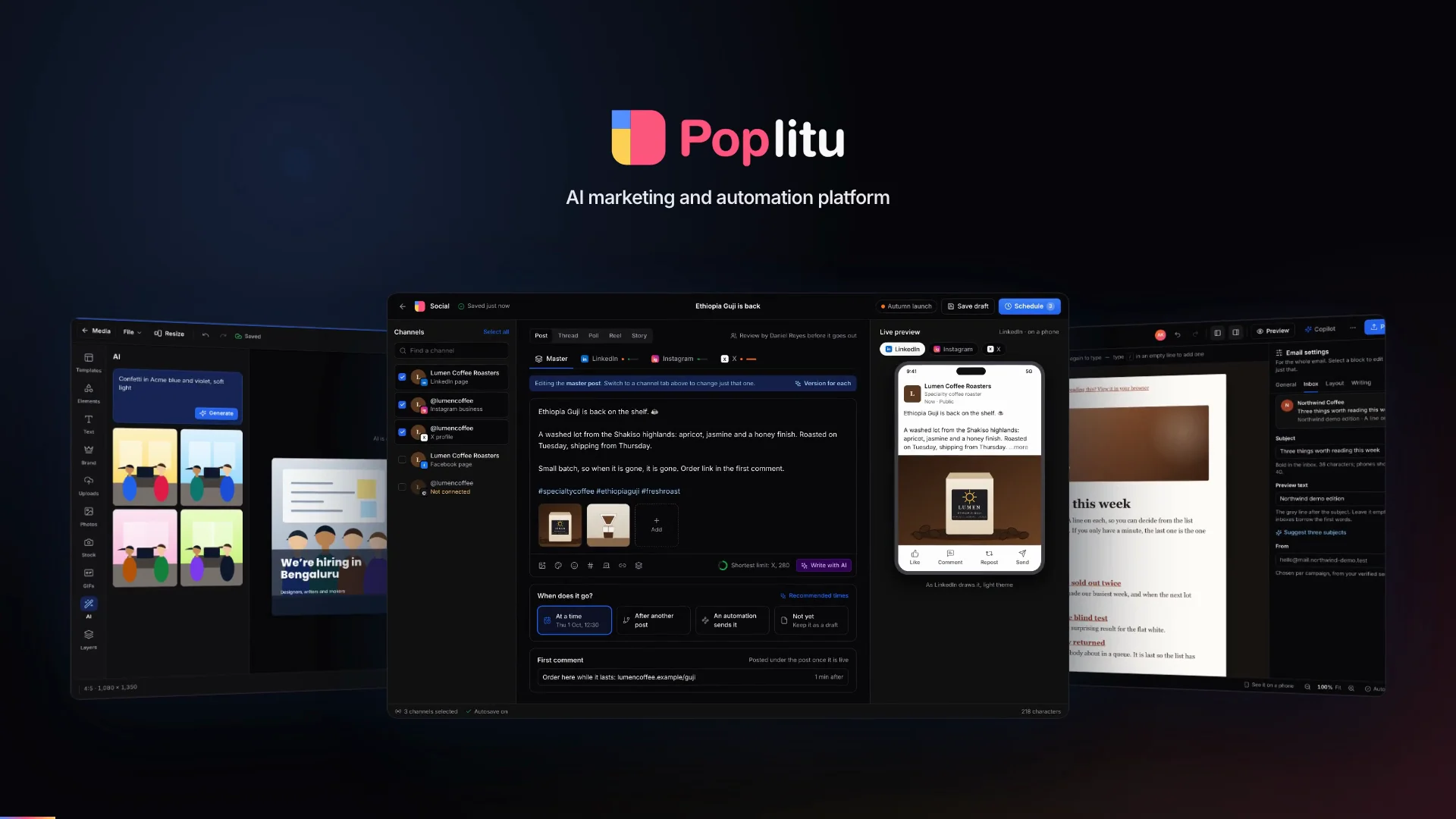
A 95-second film follows one enquiry from a form to a customer relationship management (CRM) system, then shows the rest of the platform: social, design, email, Copilot, integrations, and results. The screens in it are product previews with fictional sample data. They show how the experience is intended to work; they are not customer screenshots or a promise that every surface is generally available.
Forms A lead, at 9 pm.
How to read the diagrams
- Customer signals and product surfaces
- AI work and external actions
- Human decisions
- Durable progress after approval
One enquiry through the platform
Suppose a potential customer submits a product-interest form. The team wants Poplitu to prepare a follow-up, let a person check it, and then update the tools they already use.
- Capture the leadA form submission creates the customer signal and starts the workflow.
- Prepare the draftThe AI step receives only the context and tools allowed for this organisation.
- Ask for approvalThe workflow pauses. A person can review, edit, approve, or reject the proposed action.
- Act and record the resultAfter approval, Poplitu sends the reviewed reply, updates the CRM, and records what happened.
This example shows one automation, not a route into every Poplitu product. Forms provide the trigger, AI helps with preparation, approval preserves human control, the CRM integration performs the agreed action, and workflow history explains the result.
What the product brings together
Marketing work crosses several product areas, but they do not all sit after the same approval step. In this example, the form starts an automation that prepares a reply and updates the CRM after approval. Social publishing, design, and email campaigns are separate product areas shown later in the tour.
Social
Compose, schedule, publish, and review activity across supported social networks.
Forms and leads
Build forms, embed them in a site, and carry each submission into lead workflows.
Build messages, organise audiences, and coordinate campaign work.
Automations
Connect triggers, conditions, AI steps, approvals, and actions in a visual workflow.
Copilot
Help with multi-step work while keeping sensitive actions behind explicit approval.
Integrations
Connect more than 60 external services through a shared connection and action model.
See the platform
The stills now follow the product one area at a time. They use the same fictional coffee brand and the same preview status described above.
Forms. A team builds the intake, publishes it, and sees the same experience the visitor will use.
Automations and approval. The workflow makes the proposed AI work and the human decision visible before anything changes outside Poplitu.
Social publishing. A person can prepare one idea for several networks and then see scheduled, published, and draft work together.
Design. The editor explores several layouts from one description, then adapts the chosen direction to the sizes each channel needs.
Email. The message builder keeps structure, content, and block settings in one editing surface.
Copilot. The assistant shows the multi-step change it proposes and stops at the approval boundary before creating it.
Integrations. The catalogue gives connected tools one place in the product. The names and connection states in this preview illustrate the interface; they are not a live availability list.
Architecture behind the experience
Product
Social · forms · email
create, publish, capture, communicate
Automations · copilot
coordinate work with human approval
Shared platform
Identity and permissions
organisation-scoped access
Integration framework
connected accounts and provider actions
Durable workflow runtime
retries, waits, approvals, history
AI access layer
model routing, policy, metering
Foundation
Application data
product and workflow records
Background execution
work outside the request path
Observability
traces, metrics, errors
The shared platform is the important boundary. Product features do not each invent permissions, connection handling, workflow state, or model access. They use the same rules, so an action started by a form and an action suggested by the copilot can be reviewed and audited in the same way.
Four engineering decisions
1. Use a specialised runtime only when the workload earns it.
A runtime is the environment that executes a part of the product. TypeScript remains the default because one language across most of the product lowers the cost of changing and operating it. A different runtime earns a place only when its ecosystem or execution model fits a workload materially better.
- runtime
- TypeScript
- workload shape
- Product interfaces, business rules, integrations, and general request or data-transfer work
- cost to accept
- The default; shared types and one product language reduce coordination cost
- runtime
- Go
- workload shape
- Work dominated by high concurrency or predictable resource use
- cost to accept
- A separate toolchain and contracts across a language boundary
- runtime
- Python
- workload shape
- AI model, content search, evaluation, or document work that benefits from its ecosystem
- cost to accept
- Permissions and usage rules must still remain consistent with the product
- runtime
- Temporal
- workload shape
- Work that must survive waits, retries, signals, or deploys
- cost to accept
- Rules for repeatable replay, versioning, operational ownership, and another system to run
A concurrency-heavy workload needs predictable behaviour when many independent events arrive together. It may justify isolation when it must scale and fail independently from product requests. Python can earn a boundary when its model and retrieval ecosystem shortens experimentation and evaluation work. Temporal can earn one when waiting and recovery are part of the product behaviour rather than an implementation detail.
The rule is conservative: if TypeScript handles a workload well, the code stays there.
2. Treat waiting as durable product state.
The example workflow may wait for a schedule, retry an external provider, pause for the reviewer, and continue after a deploy. The design treats that waiting state as durable product data and requires external actions to be idempotent. An idempotency key gives repeated attempts the same identity, allowing a provider or integration boundary to recognise that an action was already accepted.
This does not make every network call exactly once. A timeout can leave the caller unsure whether the provider completed an action. The workflow records that uncertainty, retries only when the operation is safe, and otherwise asks for reconciliation, which means checking the provider's state before deciding what to do next.
- fact
- Published workflow version
- why it must survive
- A run must continue with the meaning it started with even after the editor changes
- fact
- Current step and wake-up
- why it must survive
- A restart must not forget which work is due or which approval is pending
- fact
- Approval decision
- why it must survive
- The reviewer and decision are part of the run history, not a temporary UI state
- fact
- Action identity and outcome
- why it must survive
- Retries need a stable key and a truthful record of success, failure, or uncertainty
The execution design must keep a slow model call from holding up an approval or a short provider action. It must also claim scheduled work safely and avoid one organisation monopolising shared capacity. Those are the guarantees that matter to the product. Keeping workflow meaning separate from execution technology also allows the runtime to evolve without changing a published automation.
3. Keep AI suggestions separate from external action.
The architecture puts model access behind a shared product boundary for policy, usage accounting, and audit. Keeping those concerns together makes cost and permissions reviewable as the product adds AI features without publishing the providers or routing rules used at any point in time.
- responsibility
- Provider routing
- why it is shared
- Product features do not each implement model selection and fallback
- responsibility
- Permissions and approval
- why it is shared
- A tool action follows the same organisation policy as a human action
- responsibility
- Usage accounting
- why it is shared
- Model cost can be attributed to the feature and organisation that caused it
- responsibility
- Evaluation and cache policy
- why it is shared
- A reused or model-written answer still passes a product-level quality decision
In the running example, the model may prepare text. It cannot silently turn that draft into an external action. The workflow carries the proposed action to the approval step, and the integration receives it only after a person has made the decision.
4. Keep provider differences at the boundary.
An integration provider is an external service that Poplitu communicates with. Across more than 60 provider integrations, those services differ in authorization, credentials, rate limits, error formats, and what they consider a successful request. The design goal is a consistent connection and action contract for product features while preserving provider-specific behaviour at the boundary.
- shared concern
- Connection setup
- public design goal
- Present one product flow across account sign-in (OAuth) and provider-issued credentials
- shared concern
- Credential lifecycle
- public design goal
- Protect stored credentials and handle rotation without exposing them to product features
- shared concern
- Connection health
- public design goal
- Detect when a connection needs customer attention and explain the next action
- shared concern
- Release maturity
- public design goal
- Expose integrations according to their tested product readiness
For the example workflow, the connection check happens before the outside action. A missing permission should produce a visible next step for the customer; repeatedly retrying the same permanent authorization failure would only create noise.
How the decisions stay true.
Architecture rules are useful only when everyday changes preserve them. The engineering method records consequential decisions and checks important boundaries during review and with automated checks. The goal is to make an unsafe dependency visible before release.
The same approach applies at runtime:
- State changes and the events they create are committed together where losing the event would strand later work.
- Failed background work retains enough context for a safe investigation and replay without exposing credentials.
- Implementations behind a shared boundary run the same behavioural tests, so changing an adapter does not quietly change the product contract.
What co-founding and building it taught me
Start with the customer promise
The form, approval, and final action make the product understandable. Architecture earns space only when it explains how that promise survives failure.
Make every runtime repay its cost
A second language or runtime adds deployment, monitoring, and another failure model. The workload must benefit enough to justify that permanent cost.
Treat approval as product state
Human review is part of the workflow record. It must survive a restart and stay connected to the exact action a person approved.
Poplitu continues to be built. The public product status is the source for what is available now; the film and screens on this page show the wider direction being designed around it.