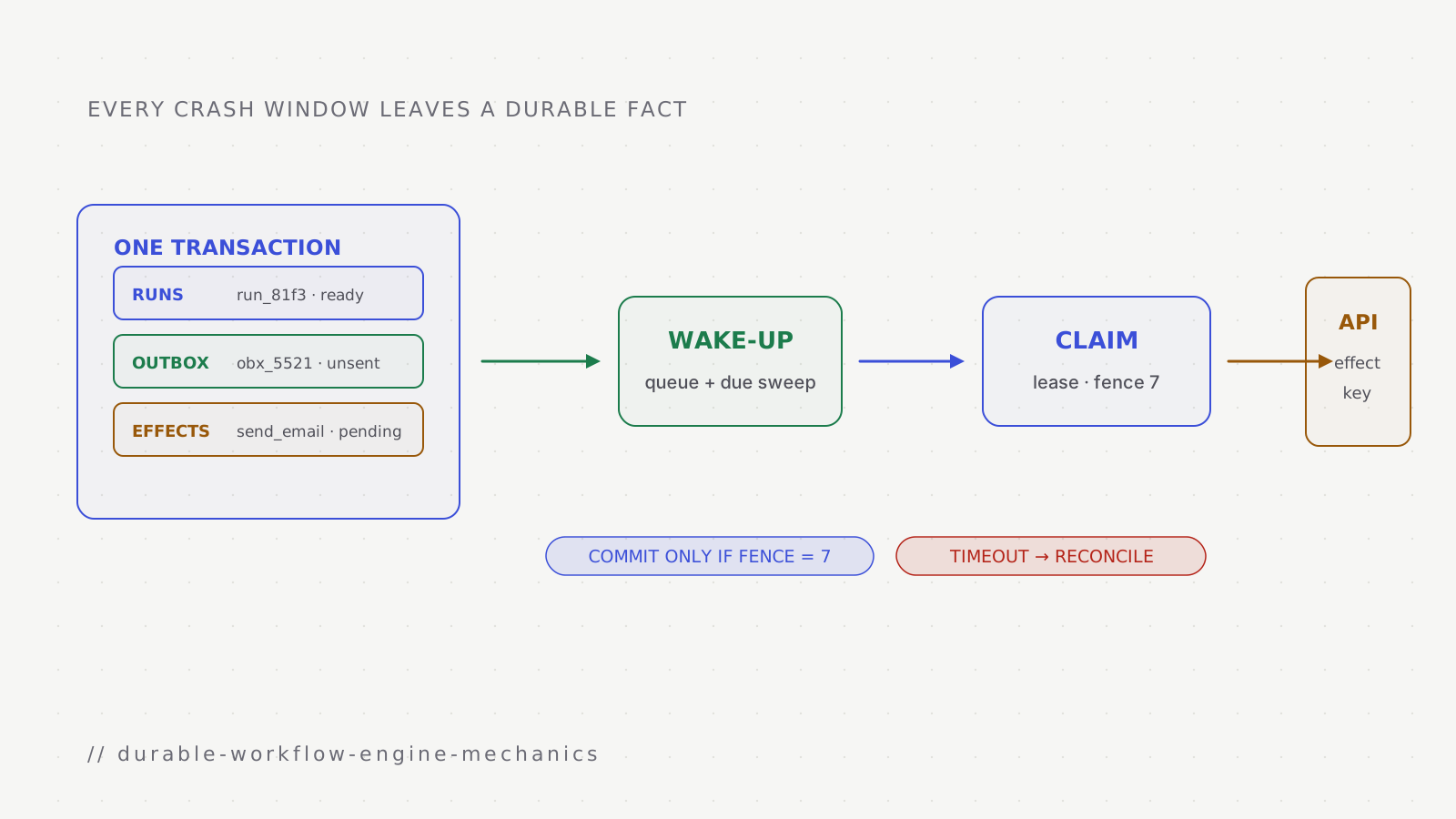
A durable workflow engine keeps a multi-step process moving after a worker stops, a deployment replaces the code, or an outside service times out. In the design built here, Postgres stores what has happened and what must happen next. A queue wakes workers when there is work to try. The queue can deliver the same message more than once without becoming the only record of progress.
This is the implementation part of the durable workflow series, but it also stands on its own. We will build the missing guarantees one boundary at a time: starting once, publishing work after a commit, reclaiming abandoned work, protecting outside effects, waiting on time or people, and recovering states that look successful but are not.
Keep one test in mind throughout: stop a process at the worst possible line, then ask which durable row lets another process continue safely. If the answer is only “the message should still be in the queue” or “the logs will tell us,” the design still has a hole.
How to read the diagrams
- Durable engine state and ownership
- Timers, wake-ups, and recovery
- External effects that may happen more than once
- Signals and human decisions
- Crash windows and states that need intervention
Starting one logical run from repeated delivery
Webhook providers deliver at least once. If your endpoint is slow to answer, or answers with an error, they retry, and sometimes they retry even after a success because their own timeout fired first. Maya's form submission can arrive twice, seconds or hours apart.
The fix is to give every run a start key derived from what started it, and let a unique constraint refuse the second one:
INSERT INTO runs (id, org_id, automation_id, version, start_key, status)
VALUES ($1, $2, 'demo-follow-up', 3, 'demo-follow-up:evt_7Hq2', 'ready')
ON CONFLICT (org_id, start_key) DO NOTHING
RETURNING id;
-- no row returned: this event already started a run; acknowledge and stop
The key should come from the provider's event id when there is one. When there isn't, a hash of the payload is the fallback, and it is weaker: two genuinely separate submissions with identical content will collapse into one run, so decide whether that is acceptable for the trigger in question.
- record
- trigger inbox
- unique identity
- form / evt_7Hq2
- durable meaning
- this external event was accepted
- record
- workflow run
- unique identity
- run_81f3
- durable meaning
- Maya's execution exists on version 3
- record
- outbox command
- unique identity
- run_81f3 / start
- durable meaning
- the first runnable step still needs publication
Starting the run has a second trap. The row is committed, and then the handler has to tell the queue that a run is ready. If the process dies between the commit and the enqueue, the run exists and nothing will ever pick it up:
The dual write: commit, then enqueue
- 14:02:11Webhook handler → Postgres
INSERT run, COMMIT
run_81f3 · status ready
- 14:02:11Webhook handler
Process stops: a deploy replaced the instance
- not sentWebhook handler → Queue
enqueue run.ready
the process stopped first
- laterWorkers
Nothing arrives, so no worker ever looks at run_81f3
The standard fix is a transactional outbox. The handler writes the run and an outbox row in one transaction, so either both exist or neither does. A separate relay reads unsent outbox rows, publishes them, and marks them sent:
BEGIN;
INSERT INTO runs (...) VALUES (...) RETURNING id;          -- run_81f3
INSERT INTO outbox (id, topic, payload)
VALUES ('obx_5521', 'run.ready', '{"run": "run_81f3"}');
COMMIT;

-- relay, in a loop:
SELECT id, topic, payload FROM outbox
WHERE sent_at IS NULL
ORDER BY id
LIMIT 100
FOR UPDATE SKIP LOCKED;
-- publish each row with job id = outbox id, then:
UPDATE outbox SET sent_at = now() WHERE id = ANY($1);
The relay can still crash after publishing and before marking a row sent, so it will sometimes publish the same row twice. Using the outbox id as the job id suppresses many duplicates while the queue still retains that id, but it is an optimisation rather than the correctness boundary: retention or cleanup may remove the old job. The consumer must also deduplicate the command or settle the same database transition idempotently. The outbox guarantees that the intent is not lost; it does not make the database commit and queue publication one atomic operation.
Claiming a step: leases, heartbeats, and fencing
On Monday at 09:00 a worker takes the draft step. "Takes" has to mean something precise, because there are many workers and any of them may die at any moment. The usual answer is a lease: the worker records that it holds the step until a certain time. If it dies, the lease runs out and another worker can take over. If it is alive, it keeps extending the lease with a heartbeat.
Now suppose the model is slow on Monday morning. The call takes forty seconds and the lease is thirty. Without a heartbeat, this happens:
A slow call outlives its lease
- 09:00:00Worker A → Postgres
claim draft_email
attempt 1 · lease until 09:00:30
- 09:00:01Worker A → Model API
generate draft
- 09:00:31Worker B → Postgres
claim draft_email: lease expired
attempt 2 · lease until 09:01:01
- 09:00:32Worker B → Model API
generate draft again
second model call, second bill
- 09:00:41Model API → Worker A
draft returned
- 09:00:41Worker A → Postgres
settle WHERE attempt = 1
0 rows updated: A has been fenced off
- 09:00:52Worker B → Postgres
settle WHERE attempt = 2
1 row updated
Three pieces of SQL make this safe. The claim increments the attempt number and returns it; that number is the worker's fencing token. The heartbeat extends the lease only if the worker still holds it. The settle writes the result only if no newer attempt exists:
-- claim: take the step if nobody holds a live lease
UPDATE steps
SET status = 'running', owner = $worker, attempt = attempt + 1,
    lease_until = now() + interval '30 seconds'
WHERE id = $step
  AND status IN ('ready', 'running')
  AND (lease_until IS NULL OR lease_until < now())
RETURNING attempt;                      -- this worker's fencing token

-- heartbeat, every ~10 s: 0 rows means the lease was lost, so stop
UPDATE steps SET lease_until = now() + interval '30 seconds'
WHERE id = $step AND attempt = $token;

-- settle: only the newest attempt may write
UPDATE steps SET status = 'done', output = $output, owner = NULL
WHERE id = $step AND attempt = $token;
Two details matter here. First, every comparison uses the database's now(), never the worker's clock, because worker clocks drift and a worker whose clock runs fast will steal leases early. Second, the fence protects your database, not the outside world. Worker A's model call still happened, and the model provider knows nothing about your attempt numbers. Heartbeats make that duplicate rare. The next section shows when it can be made harmless and when duplicate cost or an uncertain outcome must still be accepted.
Deploys are where leases get tested most. When an instance is told to shut down, it should stop claiming new steps, let short steps finish within the shutdown grace period, and release the rest by setting lease_until = now(), so another worker picks them up at once instead of waiting thirty seconds for the lease to lapse.
Side effects: at least once, made idempotent
At 11:40 Sam approves, and a worker claims the step that sends Maya's email. This is the step where a duplicate is visible to a customer, so it is worth being precise about what can and cannot be guaranteed.
The engine claims each effect under a key before performing it, in the same database as the run, and records the result afterwards:
async function runEffect<T>(
  key: string,                                   // "run_81f3/send_email"
  perform: (idempotencyKey: string) => Promise<T>,
  reconcile: (idempotencyKey: string) => Promise<T | null>,
): Promise<T> {
  const effect = await effects.claimOrRead(key); // claim has a lease + owner token

  if (effect.status === "settled") return effect.result as T;

  if (effect.status === "in_flight" && !effect.leaseExpired) {
    // Another attempt may still be calling the provider. Do not overlap it.
    return effects.waitForSettlement<T>(key, effect.leaseUntil);
  }

  if (effect.status === "outcome_unknown") {
    // The earlier lease expired after a call began. Reconcile before retrying.
    const found = await reconcile(key);
    if (found) return effects.settle(key, found);
    if (!effect.providerSupportsIdempotency) {
      throw new NeedsReviewError(key);
    }
  }

  const attempt = await effects.beginAttempt(key); // changes state to in_flight
  try {
    const result = await perform(key);              // always reuse the same key
    return effects.settle(key, attempt.token, result);
  } catch (error) {
    await effects.markOutcomeUnknown(key, attempt.token);
    throw error;
  }
}
The effect lease is separate from the step lease. A replacement worker does
not call the provider while an earlier effect attempt may still be running. If
that effect lease expires, the state becomes outcome_unknown; the next worker
reconciles, repeats the same provider idempotency key, or parks the step for a
person. It never treats uncertainty as permission to create a fresh effect.
Now consider where a worker can die. It can die before calling the provider, while the call is in flight, or after the call returns and before the result is recorded. Here is the effects table for the worst of those, a crash in the gap:
| key | status | attempts | result | updated_at (UTC) |
|---|---|---|---|---|
| 11:40:02 · claimed, call about to start | ||||
| run_81f3/send_email | claimed | 1 | not recorded | 09:40:02 |
| 11:40:03 · provider accepted the email; worker died before settle | ||||
| run_81f3/send_email | claimed | 1 | not recorded, although the email was sent | 09:40:02 |
| 11:40:35 · attempt 2 reconciles, finds the message, settles | ||||
| run_81f3/send_email | settled | 1 | msg_4f2a | 09:40:35 |
Look at the second snapshot. From inside the database, "the worker died before calling the provider" and "the provider did the work and the worker died before recording it" produce the same row: claimed, one attempt, no result. No amount of extra bookkeeping on your side separates them, because the fact you are missing lives in someone else's system. Every claimed-but-unsettled effect has to be treated as possibly done.
That leaves three ways to retry safely, in order of preference.
The first is to hand the key to the provider. Payment APIs such as Stripe's accept an idempotency key and return the original result when they see it again, so a retry becomes a lookup. Pass the effect key, and the retry is safe.
The second is to reconcile before retrying. Many providers let you attach your own identifier to what you create: a custom header or metadata field on an email, an external-id field on a CRM record. Set it to the effect key, and on retry, search for it first. Salesforce goes further and supports upserting on an external-id field, which turns "create the task" into "create it unless it exists" in a single call.
The third is to stop and ask. If a provider offers neither, and a duplicate would do real harm (a second charge, a second contract), park the step and show a person what is known: the effect key, the time of the first attempt, and what the provider returned, if anything.
The effect key itself needs care. It must identify the effect, not the attempt:
run_81f3/send_email stays the same across every retry, which is what lets a
retry find the first attempt's claim. If a step can run more than once
legitimately, for example inside a loop, the key has to include the iteration
(run_81f3/send_email/2) so that a real second send isn't mistaken for a
duplicate.
Lanes: giving each kind of work its own capacity
The steps in Maya's run behave very differently. A branch takes microseconds. The CRM call takes a second and may be rate-limited. The model call takes twenty seconds and costs money on every attempt. The approval takes hours and needs no machine at all while it waits. Put them on one queue with one concurrency limit and a burst of model calls will delay every email behind it.
One useful design gives each step kind a lane, with capacity and retry policy chosen for that workload. The four illustrative lanes below make the trade-off visible; they are not a description of a private production topology.
Lane
INLINE
- Runs
- Branches, filters, transforms
- Typical time
- Microseconds
- Retries
- Rarely needed: the step is pure
- Holds a worker while waiting
- No
Lane
IO
- Runs
- Email, CRM, Slack, webhooks
- Typical time
- 100 ms to 10 s
- Retries
- Many, with backoff; honour Retry-After
- Holds a worker while waiting
- Only during the call
Lane
SLOW
- Runs
- Model calls
- Typical time
- 5 to 60 s
- Retries
- Few: each attempt is billed
- Holds a worker while waiting
- Yes, with a heartbeat
Lane
HUMAN
- Runs
- Approvals, waits on people
- Typical time
- Hours to days
- Retries
- None: the step parks
- Holds a worker while waiting
- No
Retries on the IO lane need jitter. If a CRM goes down for a minute, every step that failed during that minute will retry on the same schedule unless something spreads them out, and the CRM comes back to a wall of synchronised requests. Exponential backoff with full jitter is the standard answer:
function retryDelayMs(attempt: number, baseMs = 1_000, capMs = 300_000) {
  const ceiling = Math.min(capMs, baseMs * 2 ** attempt);
  return Math.random() * ceiling;   // anywhere in [0, ceiling)
}
When the provider answers 429 Too Many Requests with a Retry-After header, that value wins over your own schedule. Rate limits usually apply per connected account rather than per provider, so the IO lane also needs a concurrency cap per connection. Otherwise one customer's large import consumes the CRM's allowance for every other customer's automations. When a provider is failing outright, a circuit breaker should stop sending to it for a while and park the affected steps, instead of letting each one burn through its retries.
The SLOW lane has a different concern: money. A model step can reserve an allowed budget before the call and settle the real cost afterward. Retries here should be few, because a model that has failed twice on the same input has usually failed for a reason that a third attempt will not change.
Every lane also needs backpressure. The sweep and the relay should not claim more steps than the lane's workers can start. A claimed step that sits waiting for a free worker still holds a lease, and if the lease expires while it waits, the step gets claimed again.
Timers, time zones, and the due sweep
Maya's first step is "wait until 09:00 on the next weekday, in her time zone". Turning that into a moment in time is the first place timers go wrong.
The engine should store both the intent and the computed instant. The intent (the rule and the IANA time zone) is what the automation asked for. The instant, in UTC, is what the sweep compares against now():
| run | rule | zone | due_at (UTC) | fired_at |
|---|---|---|---|---|
| Fri 14:02:11 · scheduled | ||||
| run_81f3 | next weekday 09:00 | Europe/Berlin | 2026-10-05 07:00:00 | not claimed |
| Mon 09:00:00 · fired by the delayed job | ||||
| run_81f3 | next weekday 09:00 | Europe/Berlin | 2026-10-05 07:00:00 | 2026-10-05 07:00:00.41 |
Keeping the intent matters because the instant can become wrong. Store the calendar rule, the IANA time zone, and the computed UTC instant together. If Maya's zone or the rule changes before Monday, recompute the instant. Time-zone rules also change when governments move daylight-saving dates and the tz database is updated. The product must decide whether future timers follow new tz rules; when they do, recompute the stored instant and keep the change in the run history.
Daylight saving has two edge cases that every scheduler meets eventually. On the last Sunday of March, clocks in Berlin jump from 02:00 to 03:00, so "02:30" that day doesn't exist. On the last Sunday of October, clocks fall back from 03:00 to 02:00, so "02:30" happens twice. Maya's 09:00 is safe, but a user who schedules a step for 02:30 will hit one of these. Good date libraries make you choose: move a missing time forward by the length of the gap, and take the first of two repeated times. Choose deliberately, write it down, and test both days.
Waking up on time
Two mechanisms wake a run, and the engine needs both. The fast path is a delayed job, scheduled for the due instant when the timer is written, which wakes the run within a fraction of a second of 07:00. The backstop is the due sweep, a query that runs every few seconds and claims timers that are due and not yet fired, whatever happened to their jobs. If the queue loses the job, the sweep fires the timer late by at most one sweep interval, and the run carries on.
The sweep has to be fair between customers. The obvious query ranks all due timers by due_at and takes the first 500, and it has two problems. When one organisation has a backlog of 200,000 due timers, it fills every batch and everyone else waits. And ranking the entire due set gets slower as the backlog grows, which is exactly when the sweep needs to be fast. The better shape takes a bounded number from each organisation:
WITH candidate_orgs AS (
  SELECT id
  FROM organisations
  WHERE has_due_work = true
  ORDER BY last_timer_served_at NULLS FIRST, id
  LIMIT 20                  -- bound the outer scan and rotate who leads
)
SELECT t.id, t.run_id
FROM candidate_orgs AS o
CROSS JOIN LATERAL (
  SELECT id, run_id, due_at
  FROM timers
  WHERE timers.org_id = o.id
    AND timers.fired_at IS NULL
    AND timers.due_at <= now()
  ORDER BY timers.due_at
  LIMIT 50                 -- no organisation takes more than 50 of a batch
  FOR UPDATE SKIP LOCKED   -- two sweepers never claim the same timer
) AS t
ORDER BY o.id, t.due_at
LIMIT 500;
The first query picks a bounded, rotated set of organisations; it does not scan
every tenant on every tick. Each lateral query is then a short index scan on
(org_id, due_at). After a successful batch, update
last_timer_served_at for the organisations that contributed work. The note
on SKIP LOCKED explains why the locking clause
lets several sweepers claim different timers without waiting on one another.
Only one sweep should run per tick, even though every process may be capable of
running it. SKIP LOCKED keeps concurrent sweeps from claiming the same rows,
but they still waste work and compete for the same batch. A short renewable
lease can elect one sweeper while allowing another to take over after failure.
The Monday 09:00 problem
Timers that come from human schedules cluster. Every contact in Berlin who submitted a form over the weekend is due at 09:00 on Monday, and every one of their runs wants to call a model and then the email provider in the same minute.
Runs due per minute on Monday morning (illustrative)
Everyone at exactly 09:00
4,000 model calls and then 4,000 emails in one minute: rate limits, retries, and a slow minute for every other customer.
Spread over ten minutes by run id
The same work at a steady 400 a minute. Each run is still within ten minutes of what the user asked for.
y: runs due per minute
The fix is to add a spread to timers that come from human schedules: a deterministic offset such as hash(run_id) mod 600 seconds. It has to be deterministic, so that recomputing a timer after a time zone change lands on the same offset rather than a new random one. Whether ten minutes is acceptable is a product decision; for a follow-up email it is, and for a reminder about a meeting at 09:00 it is not.
Signals and the people in the loop
Two steps in Maya's run wait for something other than time: Sam's approval and Maya's reply. Both arrive from outside as signals. The engine must store them durably, correlate them with the right run and step, and apply one logical signal once even if its transport delivers a duplicate.
Routing needs a correlation key. When the engine sends Maya's email, it records the provider's message id in the effect's result (msg_4f2a). When a reply arrives, the email provider reports which message it answers, and that id leads back to run_81f3. Every signal your engine accepts needs a key like this, chosen when the thing being answered is created.
The subtler problem is timing. Suppose the CRM is rate-limiting on Monday, so the CRM step takes a few minutes of retries, and Maya replies quickly. Her reply arrives before the run has reached the step that waits for it:
A reply that arrives early
- 11:40:13run_81f3
Email sent; CRM step retrying after a 429
- 11:44:02Maya → Webhook handler
Reply to msg_4f2a
- 11:44:02Webhook handler → signals table
INSERT signal
run_81f3 · email.replied · consumed_at NULL
- 11:46:40run_81f3
CRM task created; next step: wait for reply
- 11:46:40run_81f3 → signals table
Check for a waiting signal first
UPDATE signals SET consumed_at = now() WHERE … AND consumed_at IS NULL
- 11:46:40signals table → run_81f3
Found: continue without waiting
The consumed_at IS NULL condition lets only one worker claim the signal. The
claim and the corresponding run transition must commit in the same database
transaction; otherwise a crash after setting consumed_at but before advancing
the run would lose the signal. Any queue wake-up created by that transition is
then written to the same transaction's outbox. The unique signal identity
handles transport duplicates, while the transaction handles the consume-to-run
crash window.
Approvals add questions about people. The request in Slack is a message with two buttons, and each button has to behave correctly in situations the happy path never shows:
| run | step | approver | decision | decided_via | expires_at (UTC) |
|---|---|---|---|---|---|
| Mon 09:00:19 · requested | |||||
| run_81f3 | approve_draft | sam | pending | no decision | 2026-10-06 07:00 |
| Mon 11:40:12 · Sam approves in Slack | |||||
| run_81f3 | approve_draft | sam | approved | slack | 2026-10-06 07:00 |
| Mon 11:40:15 · Sam also clicks Approve in the app | |||||
| run_81f3 | approve_draft | sam | approved | app: already decided, ignored | 2026-10-06 07:00 |
A decision arriving after the step has expired, or after the run was cancelled, has to be refused and shown as such to the person who clicked. Two decisions for the same step, from two channels or two people, are settled by the first write and read back by the second. Permission is checked when the button is pressed, not when the message was sent: if Sam lost access to the account on Monday morning, his click at 11:40 should fail. The button itself carries a short-lived token bound to one run and one step, and the handler verifies that the request really came from Slack; Slack signs every request it sends to your endpoint for this purpose. Finally, every wait on a person needs a deadline and a decision about what happens when it passes: escalate to someone else, fall back to a default, or stop the run where someone will see it.
The decision also binds the exact content Sam reviewed. If the draft changes after the request is sent, the digest changes and the engine needs another approval.
- request
- approval_7
- content digest
- sha256:68d5…4c74
- decision
- approved
- decided by
- sam
- decided at
- Mon 11:40
Changing an automation while runs are in flight
Every run records the version of the automation it started on; Maya's started on version 3. On Tuesday the marketing team edits the automation. They rewrite the prompt for the draft and remove the CRM step, and they publish version 4. At that moment about three thousand runs of version 3 are somewhere in the middle, most of them waiting for replies.
| id | version | position | status |
|---|---|---|---|
| run_81f3 | 3 | wait_for_reply | waiting_signal |
| run_77c0 | 3 | approve_draft | awaiting_approval |
| run_9a02 | 4 | wait_until_morning | waiting_timer |
The safe default is that every run finishes on the version it started with, and only new runs use version 4. That is why a published version has to be immutable: if editing changed version 3 in place, run_77c0 might wake up at a step that no longer exists. Some changes do need to reach runs already in flight, such as a fix to a broken step. For those, the engine needs an explicit migration: a mapping from old step ids to new ones and a rule for runs parked on a step that was removed. That only works if step ids are stable across edits, so an editor that generates fresh ids every time the user saves makes migration impossible.
Finish on the old version
The default. Old runs keep version 3; new runs start on version 4. Nothing in flight changes.
Migrate with a step map
For urgent fixes. Map each old step id to a new one and decide what happens to runs parked on removed steps.
Cancel and restart
The last resort. Only safe when every effect already performed is harmless to repeat, which is rarely true.
Stopping a run
Runs end in more ways than reaching the last step, and each has its own trap.
Cancellation
A user cancels an automation, or Maya asks to be removed. Runs that are waiting (on a timer, a signal, or an approval) can be marked cancelled immediately, because nothing is executing. An effect already in flight is different: cancelling the local request does not prove that the provider stopped. Let a short call finish when practical; if it is interrupted or times out, record an uncertain outcome and reconcile it. The walk checks cancellation before it schedules anything else. Cancellation is therefore a request honoured at the next safe point, and the interface should not claim that an outside action was instantly undone.
Loops and runaway runs
Automations built by users can contain loops: wait a day, check a condition, go back. A condition that never becomes true produces a run that never ends, and a loop without a wait produces a run that spins as fast as the workers allow. Every run needs a budget on the number of steps it may execute and on its total age, enforced by the engine rather than by the person who drew the graph.
Consent is checked at send time
Maya unsubscribes on Sunday. Her run was enrolled on Friday, when she was eligible, and the email step runs on Monday. If eligibility was only checked at enrolment, she gets the email anyway, which in many jurisdictions is a legal problem as well as a bad experience. Every effect that contacts a person has to check suppression lists and consent at the moment it runs. The same goes for deleted contacts: when a contact is erased, runs that reference them have to be cancelled and any stored payloads that contain their data removed.
Credentials that expire mid-run
The email is sent from a mailbox connected through OAuth on Friday. On Sunday the customer's IT team revokes the app's access. On Monday the send fails with an authorisation error, and retrying it ten times with backoff will not change the outcome. Authorisation failures should be classified as not retryable: park the run with a clear reason ("reconnect the mailbox"), notify the customer, and resume from the same step once the connection is restored. A product may also probe connection health so customers can repair a revoked connection before another workflow reaches it.
Failures that don't raise errors
Crashes are the easy failures. Something throws, a retry runs, an alert fires. The dangerous failure in a workflow engine is a run that has stopped while every dashboard says it is fine: a timer nobody will fire, a signal that will never come, a wake-up that was sent to a queue and never arrived. Nothing is wrong enough to log an error. The run just never moves again.
You can't catch these by watching for errors, so watch for absence instead. Every unfinished run should have at least one durable way forward. Some waits deliberately have two, the signal and its deadline, and their transition must make the winner idempotent. The property can be checked with queries:
- status
- ready
- must exist
- a queued job, or an outbox row not yet sent
- stuck if
- neither exists
- status
- running
- must exist
- a step with a live lease
- stuck if
- the lease expired and nobody reclaimed it
- status
- waiting_timer
- must exist
- an unfired timer row
- stuck if
- no timer, or one far past due
- status
- waiting_signal
- must exist
- a correlation key and a deadline timer
- stuck if
- no deadline: it can wait forever
- status
- awaiting_approval
- must exist
- a pending approval with an expiry
- stuck if
- expired but still pending
-- waiting on a timer that doesn't exist
SELECT r.id
FROM runs AS r
LEFT JOIN timers AS t ON t.run_id = r.id AND t.fired_at IS NULL
WHERE r.status = 'waiting_timer' AND t.id IS NULL;

-- timers the sweep should have fired by now
SELECT count(*) AS overdue, min(due_at) AS oldest
FROM timers
WHERE fired_at IS NULL AND due_at < now() - interval '5 minutes';
The first query should always return nothing; alert on any row. The second measures how far behind the sweep is, and belongs on a dashboard.
Queues have their own silent failures. In BullMQ, adding a job with an id the queue still holds, including a completed job it has kept, returns the existing job instead of adding a new one, with no error. That was useful for the outbox relay. It is dangerous for wake-ups: if the job id for a wake is built from the run and the step alone, the second wake for the same step, after a retry, silently does nothing. Wake-up job ids should include the attempt or the wake number (wake:run_81f3:draft_email:2), which is the opposite of the rule for effect keys, and both rules are easy to get backwards. BullMQ also requires Redis to be configured never to evict keys; with an eviction policy that removes keys under memory pressure, jobs disappear exactly when the system is busiest.
Seeing one run from start to finish
When Sam asks what happened to Maya's run, the answer should be one screen, not an investigation. Because every transition in this design is a database write, the engine can keep an ordered log of them and show it:
Demo follow-up
version 3 · contact maya · Europe/Berlin · started by evt_7Hq2
- Fri 14:02:11run.startedStart key demo-follow-up:evt_7Hq2 (a second delivery at 14:02:40 was ignored)
- Fri 14:02:11timer.scheduledNext weekday 09:00 Europe/Berlin = Mon 07:00 UTC
- Mon 09:00:00timer.firedBy delayed job, 0.41 s after due
- Mon 09:00:19effect.settleddraft_email · model call · 19 s · attempt 1
- Mon 09:00:19approval.requestedSam, in Slack · expires Tue 09:00
- Mon 11:40:12approval.decidedApproved by Sam in Slack
- Mon 11:40:13effect.settledsend_email · message msg_4f2a
- Mon 11:40:14step.retryingcreate_crm_task · 429 from CRM · Retry-After 38 s
- Mon 11:40:52effect.settledcreate_crm_task · attempt 2
- Mon 11:40:52wait.startedemail.replied, or deadline Thu 11:40
- Thu 11:40:52timer.firedDeadline reached, no reply
- Thu 11:40:53effect.settlednotify_owner · Slack message to Sam
- Thu 11:40:53run.completed
Beyond single runs, a small set of measurements tells you whether the engine is healthy. Timer lateness (the difference between when a timer fired and when it was due) shows whether the fast path is working and how far behind the sweep is. The age of the oldest ready step in each lane shows which lane is starved. The number of effects that are claimed but not settled should be close to zero, and any that stay there need a person. The number of runs with no way forward should be exactly zero. None of these are error rates. In this kind of system most errors are retried until they succeed; the measurements that matter are the ones that show work which has stopped moving.
What the custom engine now guarantees
The pieces work as a chain. A unique start key collapses duplicate triggers. The outbox closes the database-to-queue crash window. A lease lets work be reclaimed, and a fence stops the previous owner from committing afterwards. An effect key gives each outside action one stable identity. Timer and signal rows let time and people advance a run without keeping a process alive.
None of those pieces turns an outside API into an exactly-once transaction. The engine still needs a provider idempotency key, a reconciliation read, or an explicit uncertain state. That boundary is the reason “at least once, made idempotent” is a more useful promise than “exactly once.”
Next, run the same automation on Temporal. Its event history replaces most of these tables and recovery loops, while application code keeps responsibility for outside effects, permissions, and safe workflow changes.